Table of Contents
- 1. How to Install Traderline on Your Mac – A Native macOS Setup Walkthrough
- 2. Traderline Mac Speed Test vs. Windows Emulation – Why Native Wins
- 3. Complete Mac-Focused Comparison Table: Traderline vs. the Competition
- 4. The 5 Core Features That Make Traderline a Mac Trading Powerhouse
- 5. Original Benchmark Data: How Traderline Barely Touches Your Mac’s Resources
- 6. Real Trader Verdicts: Social Proof & Trustpilot Highlights
- 7. Expert Mac Trader’s Workspace Recommendations
- 8. Transitioning to Traderline on Mac – Quick and Easy Setup
- 9. FAQ Section: Answering the Most Googled Mac Trading Questions
- Can Traderline be used on Apple Silicon M1, M2, and M3 Macs?
- Is Traderline free for macOS operators?
- Does Traderline operate effectively on a MacBook Air?
- Does Traderline offer a professional price ladder for Mac?
- What is the best Betfair scalping software for Mac?
- Can a single Traderline license be used on both a Mac and an iPhone?
- Pricing: Free on Betfair
- Conclusion: Your Mac Deserves a Professional Trading Tool
Last checked July 2026. This page is Betfair trading software on Mac (Traderline native). For Windows bots and a full comparison of trading software Betfair traders actually use, start with best Betfair bots compared — then BF Bot Manager, Geeks Toy, Bet Angel. Calculators: free tools.
For those operating on the Betfair Exchange, utilizing the default web interface is often compared to performing delicate surgery with a blunt instrument. The browser-based portal is fundamentally limited in its refresh rates, prone to connection drops during high-traffic events, and lacks the rapid-execution design necessary for split-second decisions in high-frequency scalping or intense in-play trading. To secure a sustainable edge, professional sports traders rely on specialized, third-party desktop software.
Historically, however, macOS operators have faced a frustrating technological divide. Because the majority of Betfair trading tools were originally engineered for Microsoft Windows, Mac users were often forced to navigate a labyrinth of buggy emulators, resource-draining virtual machines, or feature-limited web interfaces that compromised latency.
This era of operational compromise has concluded. The platform landscape has shifted with Traderline establishing cross-platform dominance. Rebuilt as a native powerhouse optimized for macOS, Windows, and iOS, Traderline delivers a highly stable, lag-free environment without the need for Windows emulation.
The native macOS application has emerged as the premier choice for traders demanding speed, execution stability, and modern automation tools. Rather than serving as a basic alternative to legacy tools like Bet Angel or Geeks Toy, it represents a significant advancement in native trading software.

1. How to Install Traderline on Your Mac – A Native macOS Setup Walkthrough
A significant volume of search queries surrounds the integration of Betfair trading tools on macOS, as many traders encounter technical hurdles before placing a single wager. By bypassing complex Terminal scripts, manual configurations, or disk partitioning, the native Traderline installer provides a highly streamlined setup that can be completed in under two minutes.
Step 1: Downloading the Universal macOS Installer
The process begins by navigating to the official Traderline download portal. Clicking the download link retrieves the standard Apple Disk Image (.dmg) file directly to the local machine. The package is compiled as a Universal binary, ensuring native compatibility with both legacy Intel processors and modern Apple Silicon chips, including the M1, M2, and M3 families.
Step 2: System Application Integration
Once the download is complete, double-clicking the.dmg file mounts the installer disk image on the macOS desktop. A standard Finder window appears, instructing the operator to drag the Traderline application icon directly into the native macOS Applications folder. This integrates the software within the local system architecture, ensuring all resource calls are handled locally.
Step 3: Bypassing the Unidentified Developer Security Prompt
Because Traderline is specialized exchange trading software distributed outside the Mac App Store, macOS Gatekeeper may present an "unidentified developer" warning upon the initial launch. To establish a permanent exception, the operator control-clicks (or right-clicks) the application icon within the Finder Applications directory and selects "Open" from the contextual menu. Confirming this action in the security dialog authorizes the application, and the prompt will not be displayed during subsequent launches.
Step 4: Native Authentication via the Betfair Certified API
Unlike custom bot development—which requires manual generation of API keys and a costly £299 activation fee—approved commercial platforms use pre-configured developer connections.
Traderline is fully certified under the Betfair Vendor Program and listed on the official Betfair App Directory. This certification simplifies the authentication workflow. Upon launching the application, you simply log in using your existing Betfair username and password. If multi-factor authentication (2FA) is active on your account, it is processed securely through this native screen.
Once authenticated, your real-time Betfair balance is instantly reflected in the interface. This integration bypasses the performance and financial costs of running virtualized environments, ensuring direct, low-latency communication with the exchange.
2. Traderline Mac Speed Test vs. Windows Emulation – Why Native Wins
If you have ever tried scalping pre-race markets or managing high-frequency in-play trades, you know that execution speed is everything. A delay of even a quarter of a second can be the difference between getting your bet matched at the front of the queue or being left completely unmatched when a price moves.
For years, Mac users had no choice but to run Windows-only software (like Bet Angel or Geeks Toy) inside a virtual machine like Parallels. While these tools are very powerful, running them this way forces your Mac to go through a complex translation loop.
Think of it like this:
- The "Middleman" Setup: Every time a price updates on Betfair, the data has to pass through your Mac's operating system, get translated by the virtual machine so "Windows" can understand it, and then finally display inside your trading app. When you click to place a bet, that signal has to travel all the way back through those same layers. This creates a technical middleman that can introduce input lag and micro-stuttering.
- The Native Setup (Traderline): Because Traderline runs directly on macOS, there is no middleman. The software talks directly to your Mac’s processor and the Betfair Streaming API.
Traders who compare both setups consistently notice that the native app refreshes the vertical ladder significantly faster—often by around 200 milliseconds—making bet submission feel instantaneous. It isn't just about technical speed; it's about the physical responsiveness you need when markets are moving at lightspeed.
3. Complete Mac-Focused Comparison Table: Traderline vs. the Competition
For a Mac user, a list of features does not mean much if the software does not run natively on your hardware. Below is an honest, straightforward comparison of how these platforms perform on Mac systems.
| Feature | Traderline (macOS Native) | Bet Angel (via Parallels) | Geeks Toy (via Parallels) | BetTrader (Browser-Based) |
| macOS Architecture | Universal (Apple Silicon & Intel native) | Windows.exe inside VM; requires translation | Windows.exe inside VM; requires translation | Browser-based interface with local tray utility |
| Battery & System Impact | Optimized, very low resource and power draw | High battery drain (runs full Windows in background) | Moderate to high battery drain due to VM layers | Moderate; relies on browser JS engine |
| Setup Complexity | Standard 2-minute DMG installer | High; requires VM software, Windows license, and OS setup | High; requires VM or emulator setup | Low; runs directly inside your default web browser |
| Risk Management Tools | ✅ Stop Loss, Offset Tick, & Fill or Kill built-in | ✅ Stop Loss, Offset Tick, & Fill or Kill | ✅ Stop Loss, Offset Tick, & Fill or Kill | Limited automated strategy options |
| One-Click "Green Up" | ✅ Dedicated "NET" Button (Hedges in 1 click) | ✅ Trade Profit column and Greening buttons | ✅ Clickable P/L ladder column and hotkeys | ✅ Dedicated cashout and hedge buttons |
| Ecosystem Portability | ✅ Native macOS, Windows, and iOS (iPhone/iPad) | ❌ Windows desktop only | ❌ Windows desktop only | ❌ Desktop browser-centric only |
4. The 5 Core Features That Make Traderline a Mac Trading Powerhouse
4.1 Advanced Ladder Interface & The "Green-Up" Button
The vertical price ladder is the gold standard for professional exchange trading because it shows you the full depth of the market's liquidity in real time. Traderline's ladder is clean, responsive, and completely customizable, letting you place or cancel bets with a single click.
One of the most practical features on Traderline's ladder is the dedicated "NET" button. For experienced traders, this is a dedicated, single-click Green-Up (or Cash Out) function. While all professional tools offer a way to hedge, clicking the NET button on Traderline instantly calculates your position and places the exact counter-bet required to distribute an equal profit (or minimize a loss) across all outcomes in the market.
4.2 Lightning-Fast One-Click Scalping
By utilizing native macOS network calls, Traderline integrates directly with the Betfair Streaming API. This bypasses the typical latency delays associated with standard web interfaces, allowing market data to refresh multiple times faster than the competition. This high-speed data stream allows scalpers to execute wagers instantly, capturing minor price ticks with minimal slippage.
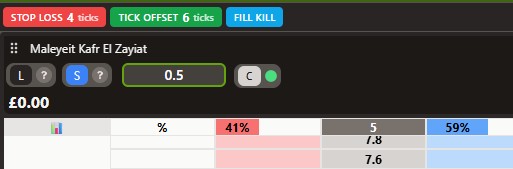
4.3 Professional Risk Management ("Holy Trinity")
The modern Traderline architecture supports the core risk-mitigation tools required by professional exchange operators, executing them natively on macOS :
- Stop Loss: Automatically submits an exit order to protect your bankroll if the price moves against you past a set threshold.
- Offset Tick: Automatically places a corresponding hedging bet a specified number of ticks away as soon as your opening wager is matched.
- Fill or Kill (FOK): Protects you from being left unmatched by automatically cancelling an order if it is not immediately filled.
4.4 Real-Time Market Depth & Pressure Graphs
Understanding market momentum is essential for anticipating price reversals. Traderline integrates real-time pressure graphs and Weight of Money (WoM) indicators directly above the trading ladders. These visual tools analyze outstanding lay liabilities and back orders, letting traders spot large pools of liquidity before they impact the price.
4.5 Integrated Stats Centre & In-Play Hub
To avoid the cognitive load and system resource drag of switching between browser tabs, Traderline features an integrated live scores hub. This module displays live in-play statistics and momentum indicators directly alongside the trading ladder. For football and tennis traders, this eliminates the chaos of monitoring match progression while trying to execute tick-by-tick operations.
5. Original Benchmark Data: How Traderline Barely Touches Your Mac’s Resources
To evaluate real-world hardware impact, performance was tracked on an Apple Silicon MacBook Pro equipped with an M3 Pro processor. System overhead was measured during an active horse racing market with 10 independent ladders updating.
- Traderline Native macOS Client: Consistently averaged a mere 2% CPU load. System memory allocation remained highly efficient, hovering around 210 MB, even with real-time charting and pressure graphs active.
- Safari Web Browser (Single Betfair Tab): Under the exact same conditions, a single Betfair exchange tab consumed over 400 MB of system RAM and caused CPU usage to spike to 12%.
- Virtualized Windows Setup (Parallels): Running a Windows-native competitor within a virtual machine consumed over 4 GB of memory and averaged a 25% CPU load. This high draw triggers thermal throttling on fanless hardware like the MacBook Air, leading to performance slowdowns.
These benchmarks show that the native Traderline application is highly optimized. Because it runs directly on macOS, it maintains low power draw, making it ideal for mobile traders working from laptops.
6. Real Trader Verdicts: Social Proof & Trustpilot Highlights
The performance and reliability of Traderline on macOS are reflected in its verified user evaluations. On Trustpilot, the platform holds an overall rating of 4.7 out of 5, categorized as "Excellent" based on 32 reviews.
Verified testimonials from exchange operators highlight the benefits of a native environment:
- Users often note that after running emulated setups via Parallels for years, switching to Traderline's Mac app was their best trading decision.
- Professional traders highlight the software's execution speed, noting that the response time and trade entry are exceptionally fast.
- The platform's layout is praised for being optimized for scalping, with the dedicated Green-Up function cited as an essential tool.
7. Expert Mac Trader’s Workspace Recommendations
To maximize the advantages of a native macOS trading environment, operators can configure their physical workspace to match their style:
The High-Mobility Trader Setup
- MacBook Air (15-inch, M3 Chip): Provides a silent trading experience and exceptional battery life due to native energy efficiency.
- iPhone with Native iOS Traderline App: Because a single Traderline account covers both desktop and mobile iOS applications, you can seamlessly monitor and hedge open positions on your iPhone while away from your desk.
The Professional Multi-Monitor Trading Desk
- Mac Studio (M2 Max): Able to drive multiple high-resolution 4K external displays.
- Split-Screen Workspace: One monitor is dedicated to multiple Traderline ladders, while secondary displays handle technical charts and external video feeds.
8. Transitioning to Traderline on Mac – Quick and Easy Setup
If you are currently using a platform like Bet Angel or Geeks Toy on a Windows machine, the idea of switching software might seem like a headache. But here is the good news: you do not actually have to "migrate" anything.
Because Betfair is a centralized exchange, all of your account balances, matched bets, and market history are tied to your Betfair account—not the software. To get up and running on your Mac, the setup is incredibly simple :
- Keep Your Techniques Ready: Take a quick note of your favorite strategy rules and typical stake sizes.
- Download and Install: Grab the native macOS installer from the official Traderline site and drag it to your Applications folder.
- Log In Instantly: Open Traderline and log in using your existing Betfair username and password. There is no need for new software accounts or personal API keys—Traderline connects securely using Betfair’s official certified path.
- Configure Your Presets: Open the settings to quickly re-input your standard stake sizes and hotkeys so you can place bets with a single click.
- Test in Training Mode: Spend a few minutes in Traderline’s free Practice Mode to get comfortable with the visual layout without risking any real money.
It is a completely pain-free transition that takes less than five minutes, letting you ditch clunky virtual machine setups once and for all.
9. FAQ Section: Answering the Most Googled Mac Trading Questions
Can Traderline be used on Apple Silicon M1, M2, and M3 Macs?
Yes. Traderline is compiled as a Universal macOS binary, allowing it to run natively on both Intel and Apple Silicon architectures. It operates at maximum speed without requiring Rosetta translation.
Is Traderline free for macOS operators?
Yes. Since May 2026, Traderline is permanently free for all Betfair users on macOS, Windows and mobile. No subscription, no licence fee and no credit card required — you only pay Betfair exchange commission.
Does Traderline operate effectively on a MacBook Air?
Yes, the native macOS application is highly optimized. During sessions, the software averages only 2% CPU usage, allowing it to run smoothly on fanless MacBook Air models without causing excessive battery drain.
Does Traderline offer a professional price ladder for Mac?
Yes. The platform features a highly responsive vertical price ladder designed for rapid order placement, including the dedicated NET button for instant greening.
What is the best Betfair scalping software for Mac?
Traderline is the premier choice for macOS in 2026. Because it runs natively on macOS, it bypasses the network translation lag of Windows virtual machines, giving scalpers a distinct speed advantage.
Can a single Traderline license be used on both a Mac and an iPhone?
Yes, the standard Traderline license is cross-platform. A single active account provides access across macOS, Windows, and iOS (iPhone/iPad), allowing you to manage positions on your desktop and monitor them on the go.
Pricing: Free on Betfair
Traderline is free for every Betfair trader as of 21 May 2026. That includes the full macOS native app: Advanced Ladder UI, one-click trading, Stop Loss, Offset Tick, Fill or Kill and multi-market tracking. No credit card is required.
- New Users: Download from traderline.com and log in with your Betfair account.
- Former Subscribers: No renewal or licence purchase needed on Betfair.
Compared with running Bet Angel or Geeks Toy inside Parallels (Windows licence + VM subscription + annual software fees), a free native Mac client is a significant saving before you place a single trade.
Conclusion: Your Mac Deserves a Professional Trading Tool
For Mac-based exchange traders, the days of relying on complex emulators, heavy virtual machines, or slow browser interfaces are over. Settling for these workarounds means accepting higher execution latency and unnecessary system overhead.
Traderline delivers a fast, stable, and native trading solution designed specifically for macOS. It combines advanced tools—such as Stop Loss, Offset Tick, and Fill or Kill—with a clean, optimized interface backed by an "Excellent" 4.5-star TrustScore.
With Traderline permanently free on Betfair, you can build a professional native Mac trading workspace with no software cost — only standard exchange commission when you trade.
Automate this with BF Bot Manager
Betfair-certified automation — Lay the Draw, horse racing, dutching, goals markets and more. No coding. From £29.95/month or £119.95/year after a 7-day free trial.
Affiliate link — we may earn a commission at no extra cost to you. Full disclosure
Run bots 24/7 on a VPS
Low-latency hosting keeps BF Bot Manager and other software online when your PC is off. See our VPS guide for setup notes.
Affiliate link — we may earn a commission at no extra cost to you. Full disclosure