Table of Contents
- Why the Gruss Ladder Matters for UK Traders
- Install, Login and First Connection
- The Ladder Interface: How Bets Fire
- Trading Mode: One-Click Execution
- Tick Offset: Built-In Scalp Automation
- Excel Triggered Betting: Your First Automation Layer
- Pre-Race vs In-Play: Ladder Settings
- Gruss vs Geeks Toy vs Bet Angel for Ladders
- Graduating from Gruss to BF Bot Manager
- Your First Real Session Checklist
- Common Gruss Ladder Mistakes
- API, VPS and Connection Stability
- Related Guides
Quick answer: Install Gruss Betting Assistant, connect Betfair, open the Ladder Interface, enable Trading mode, configure stake presets, set Tick Offset for auto green-up, then link Excel triggered betting for formula-driven entries. Full manual: Gruss user guide. Graduate to BF Bot Manager when rules need unattended execution.
Why the Gruss Ladder Matters for UK Traders
The Betfair website is too slow for tick scalping, pre-race steam chasing and in-play goal reactions. Gruss Betting Assistant connects via the Betfair API, refreshes prices faster than the browser, and gives you a vertical depth-of-market ladder — back volume on one side, lay volume on the other, prices down the centre.
What sets Gruss apart from lighter ladder tools is the path to automation without leaving the platform. Excel triggered betting feeds live data into your spreadsheet; formulas output BACK or LAY commands Gruss executes instantly. Tick offset automates one-tick scalps after a manual entry. That combination makes Gruss the best-value bridge between manual trading and full bots like BF Bot Manager.
This guide maps the official Gruss Betting Assistant user guide to a practical UK setup — ladder first, Trading mode second, Excel third. For pricing and feature context, see our Gruss review and automation software comparison.
Install, Login and First Connection
Step 1 — Download and connect
- Start the 30-day Gruss free trial from the official site.
- Enter your Betfair Exchange credentials — API login goes direct to Betfair.
- Confirm the connection indicator in the status bar shows green before opening markets.
- Bookmark the online help — Gruss documentation is thorough but spread across topics.
You need a Betfair API key if you have not traded via third-party software before. Gruss also supports BETDAQ with a free version — useful for practice, but this guide focuses on Betfair.
The Ladder Interface: How Bets Fire
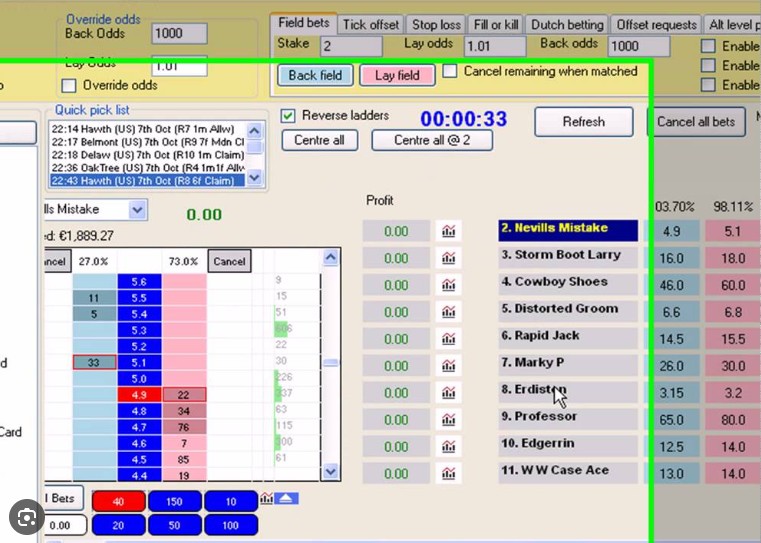
Per the manual's Ladder Interface section, the vertical ladder shows every price level with available back and lay volume. This is where most Gruss traders spend their session time.
- Bet submission: With Trading mode on, click available volume at your target price on the back or lay side.
- Stake box: Type a stake or click a preset button before firing — the active stake applies to the ladder your cursor is over.
- Depth of market: Scroll the ladder to see liquidity several ticks away — essential for planning entries and exits before you click.
- Hedge / trade out: One-click green-up calculates the opposite bet for guaranteed P&L across outcomes. Pair with our green-up calculator before large lays.
- FOK and KIP orders: Fill-or-Kill and Keep-in-Play order types help manage fast in-play markets where partial fills are dangerous.
Gruss ladders are functional rather than flashy — prioritise depth visibility and stake clarity over aesthetics. Save a layout once stakes and depth range feel right.
Right-click and view settings
Customise the ladder via view menus and right-click options:
- Price depth range — narrow to 2.00–20.0 for pre-race favourites; widen to 50.0–1.01 for in-play football Draw runners.
- Column layout — show traded volume alongside available volume to spot thin offers before you lift them.
- Runner info — silks and cloth numbers on horse markets reduce mis-clicks on busy cards.
Save a pre-race horse layout and a separate in-play football layout. Reusing the same depth across sports is a common beginner mistake.
Trading Mode: One-Click Execution
Trading mode is Gruss's equivalent of Geeks Toy's live betting or Bet Angel's one-click screen. When enabled, ladder clicks place bets immediately — no confirmation popup.
- Learning phase: Keep Trading mode off for your first session. Confirm each bet deliberately until back vs lay clicks feel automatic.
- Live scalping: Turn Trading mode on only after stake presets are configured and you have a written exit plan.
- Session discipline: Pair Trading mode with a written max loss per race or match — software cannot stop you widening limits emotionally.
Trading mode plus wrong stake preset is how beginners lay £50 when they meant £5. Configure presets in Staking settings matched to your bankroll % plan:
| Bankroll | Suggested presets (£) | Notes |
|---|---|---|
| £500 practice | 2 / 5 / 10 / 20 | First live week, pre-race only |
| £2,000 | 5 / 10 / 20 / 50 | 1% risk cap per trade |
| £5,000+ | 10 / 25 / 50 / 100 | Check lay liability before arming presets |
For lay bets, stake buttons show stake — not exposure. Use the lay liability calculator before arming large lay presets.
Tick Offset: Built-In Scalp Automation
Tick offset is Gruss's most underrated semi-automation feature. Place a manual back; when it matches, Gruss automatically submits a lay one tick higher (or your configured offset) to lock a small profit.
- Place a
BACKon the ladder at your entry price. - Enable Tick Offset and set
+1(or+2for wider targets). - On match, Gruss fires the counter-lay without you clicking — the scalp completes in milliseconds.
- If the market steams against you before offset fills, cancel manually or set a stop via Excel triggers (below).
Tick offset suits pre-race horse scalping where one-tick improvements are common. It does not replace a full exit plan on in-play markets — prices can gap several ticks on goals. For in-play football, see strategy context in pre-race horse trading and our Lay the Draw guide if you are eyeing automation next.
Excel Triggered Betting: Your First Automation Layer
The manual's Excel Integration section is Gruss's killer feature. Live market data streams into mapped cells; your formulas decide when to bet.
How the data feed works
- Gruss opens a linked Excel workbook beside the trading interface.
- Mapped cells receive back price, lay price, traded volume, WOM and other fields per runner.
- You write conditions in adjacent cells — e.g.
=IF(AND(B2>2,C2>50000),"BACK",""). - Trigger cells output commands:
BACK,LAY,CANCELor stake modifiers Gruss reads each refresh cycle. - On trigger change, Gruss executes immediately — no button press required.
Example: automated entry on volume and price
- Link Excel to a pre-race horse Win market.
- Map back price and total matched for your target runner.
- Formula: back when price is between 3.0 and 5.0 AND matched volume exceeds £10,000.
- Output
BACKwith stake in the trigger stake cell. - Enable tick offset
+1for automatic exit on match.
Advanced users add VBA for complex state machines. Beginners do not need it — standard formulas cover most entry filters.
Multi-market Excel tabs
Gruss supports multiple market tabs, each linked to a separate Excel sheet. Monitor three horse races or two football matches simultaneously — but only open as many as you can audit. Excel automation scales until it does not: twenty concurrent triggers without logging is how spreadsheets become expensive.
Refresh rate from Excel
The manual documents controlling market refresh rate from an Excel cell — speed up data polling in-play, slow it pre-race to save resources. Useful when one workbook handles both phases of a football strategy.
Pre-Race vs In-Play: Ladder Settings
| Trading style | Ladders open | Price depth | Automation |
|---|---|---|---|
| Pre-race horse scalping | 3–4 | Moderate near current price | Tick offset + optional Excel entry |
| In-play horse | 4–6 | Wide (50.0 → 2.00) | Manual + FOK; Excel for filters only |
| Pre-match football | 2–4 fixtures | Moderate | Excel time-to-kick-off triggers |
| In-play football | 1–3 matches | Wide on Draw runner | Excel score/price triggers; offset risky |
Gruss integrates Total Performance Data (TPD) for live GPS horse tracking — a niche edge on UK racecourses. Most traders still pair ladders with horse racing statistics for form context.
Gruss vs Geeks Toy vs Bet Angel for Ladders
| Platform | Ladder speed | Automation | Best for |
|---|---|---|---|
| Gruss | Solid; not the fastest | Excel triggers, tick offset | Spreadsheet traders, value seekers |
| Geeks Toy | Fastest for many UK scalpers | OCO, Multi-Bet only | Pure manual speed — ladder guide |
| Bet Angel | Fast; feature-rich | Guardian, Global Settings | Power users — ladder guide |
Graduating from Gruss to BF Bot Manager
Gruss Excel triggers are powerful for monitored sessions — you watch the spreadsheet, Gruss fires, you intervene when something looks wrong. That breaks down when:
- You need unattended Lay the Draw across twenty Saturday 3pm matches.
- Recovery staking must track losses across concurrent markets accurately.
- After Bet Rules — profit target, stop-loss, time exit — must run without Excel recalculating.
- You want tip imports, Simulation mode or VPS deployment.
That is the BFBM graduation point. If you can write your Gruss Excel entry conditions on one page and define exits in three bullet points, you are ready for BFBM Simulation mode.
- Document your Gruss rules: entry filters, stake, exit, stop.
- Clone the closest BFBM example strategy from the hub.
- Run a full card in Simulation — compare bet log to what Gruss would have fired.
- Go live on BFBM with the same stakes; keep Gruss for discretionary scalps if you like.
Full comparison: best Betfair automation software 2026. BFBM walkthrough: first bot in 10 steps.
Your First Real Session Checklist
- Trading mode off — 30+ practice clicks across 2 races with tiny stakes.
- Stake presets configured; lay liability checked on largest preset.
- One meeting or one football kick-off block — not ten markets on day one.
- Tick offset tested on a single runner before multi-market Excel.
- Excel triggers logged: timestamp, trigger value, result — every fire.
- Written session stop — max loss before you close Gruss entirely.
Common Gruss Ladder Mistakes
- Trading mode on too early — accidental clicks at full stake.
- Excel trigger without exit — entry automation with manual-only exits bleeds on reversals.
- Wrong runner mapped in Excel — formula fires on runner 3, you thought runner 1.
- Tick offset in-play on goals — price gaps blow through offset before fill.
- Too many market tabs — Excel multi-market without logging is un-auditable.
- Skipping the manual — the help.htm guide documents edge cases generic reviews miss.
API, VPS and Connection Stability
Gruss is lightweight — it runs on modest hardware and small VPS tiers if you automate Excel sessions remotely. Remember Betfair's two-connection limit: Gruss on a VPS plus BFBM locally is a common split.
If ladders feel sticky, check for duplicate API sessions (Betfair website + Gruss + another tool), verify Betfair market status, and reduce open market tabs. Ask Ask Bob specific manual questions once the Gruss manual is indexed.
Key takeaways: Configure ladder depth and stakes → enable Trading mode only when ready → use tick offset for scalps → link Excel for formula triggers → graduate to BFBM when rules need unattended execution. Manual: Gruss user guide.
Related Guides
- Gruss Betting Assistant review
- Geeks Toy ladder setup — manual speed comparison
- BFBM first bot — graduation path
- Best automation software 2026
Outgrown Excel triggers?
BF Bot Manager runs the same rules hands-off — LTD, horses, goals. Test in Simulation before going live.
Affiliate link — disclosure
Try Gruss free for 30 days
Ladder trading, Excel triggers and tick offset — the cheapest path to Betfair automation.
Disclaimer: Exchange trading involves risk. Past performance does not guarantee future results. This guide is educational only.
Automate this with BF Bot Manager
Betfair-certified automation — Lay the Draw, horse racing, dutching, goals markets and more. No coding. From £29.95/month or £119.95/year after a 7-day free trial.
Affiliate link — we may earn a commission at no extra cost to you. Full disclosure
Ready to automate these rules?
If you can write entry, exit, stop and time rules on one page, you have outgrown manual trading. BF Bot Manager runs the same logic hands-off — test in Simulation mode first.
Affiliate link — we may earn a commission at no extra cost to you. Full disclosure