Table of Contents
- Why Triggers Matter on Betfair
- Install, Connect and Open the Trigger Editor
- Test Mode: Non-Negotiable Before Live
- Market Locator: Auto-Loading Markets
- Anatomy of a Trigger: Conditions and Actions
- Worked Example: Lay the Draw with Triggers
- Time Machine: Backtesting Triggers
- Test Mode vs Time Machine vs Live
- MF Pro vs BF Bot Manager for Automation
- Essential Trading Tools Beside Triggers
- Session Limits and Risk Management
- VPS Deployment for 24/7 Triggers
- Common Trigger Mistakes
- When to Start with BFBM Instead
- Related Guides
Quick answer: Install Market Feeder Pro, enable test mode, configure Market Locator to auto-load markets, build entry and exit triggers with conditions and actions, backtest in Time Machine, then go live with session stake caps. Trigger docs: marketfeeder.co.uk/learn/triggers. For standard LTD without scripting, BFBM Lay the Draw is faster.
Why Triggers Matter on Betfair
Manual ladder trading works until you need to lay the Draw on eighteen Saturday 3pm matches, green up on the first goal, cap loss on 0-0 at half-time, and recover stakes across concurrent markets — all while you are not at the keyboard. That is what triggered betting solves.
Market Feeder Pro (MF Pro) pioneered this model on Betfair. A trigger is a script: when conditions match (price, time, volume, score, market status), actions fire (back, lay, cancel, green up, change stake). MF Pro evaluates every loaded market each refresh cycle — often sub-second — and executes without human clicks.
This guide translates official MF Pro trigger documentation into a practical first-bot workflow for UK traders. For pricing and rivalry context, see our Market Feeder Pro review and automation software comparison.
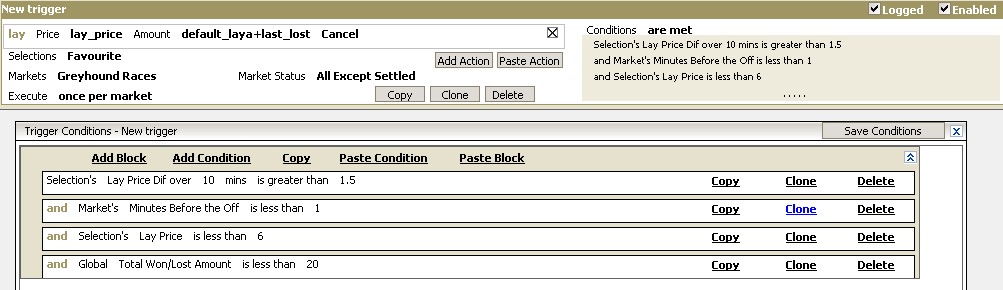
Install, Connect and Open the Trigger Editor
Step 1 — Download and connect
- Start the MF Pro trial from the official site (7-day trial typical — verify current offer).
- Enter Betfair Exchange API credentials — see API key guide if needed.
- Confirm connection status before loading markets — triggers silently skip when disconnected.
- Open Triggered Betting from the main menu and read the triggers learning section for condition syntax reference.
MF Pro is Windows desktop software. Mac users need a Windows VM or VPS. The UI shows its age; focus on logic, not aesthetics.
Test Mode: Non-Negotiable Before Live
Test mode is MF Pro's paper-trading layer. Triggers evaluate live prices and log what would have fired — but no bets reach the exchange. Treat it like BFBM Simulation mode:
- Build entry trigger → run one session in test mode → verify bet log matches intent.
- Add exit trigger → re-run → confirm green-up or stop fires on the right condition.
- Deliberately break a condition — confirm the trigger does not fire when it should not.
- Only disable test mode when bet history aligns with your written strategy for a full card.
Skipping test mode on complex triggers is the fastest way to discover your Martingale recovery chain was wired to the wrong market status field.
Market Locator: Auto-Loading Markets
Triggers need markets to evaluate. Market Locator scans Betfair and loads qualifying events into your session — the MF Pro equivalent of BFBM's Auto Load.
Common Locator filters for UK football LTD:
- Sport: Soccer
- Market type: Match Odds
- Country: GB (+ major leagues if you expand)
- Time to start: 0–120 minutes (pre-match) or in-play flag
- Draw lay price: between 3.0 and 4.5
- Minimum matched volume: £20,000+ (avoid illiquid traps)
For horse racing bots, filter Win markets 5–30 minutes before off with minimum liquidity and runner count caps. BFBM equivalents: Auto Load guide and horse racing bot.
Anatomy of a Trigger: Conditions and Actions
Every trigger has two halves, documented on marketfeeder.co.uk:
Conditions (when)
- Price — back price, lay price, last traded price above/below threshold
- Volume — total matched, available at best back/lay
- Weight of Money — back money vs lay money percentage
- Time — minutes to start, in-play elapsed time
- Market status — open, suspended, in-play, settled
- Score — football goal count, tennis set score
- P&L — settled loss triggers recovery on next market
Actions (what)
- Place back / lay — with fixed or calculated stake
- Green up — equalise profit across outcomes
- Cancel all — clear unmatched before suspension
- Adjust stake — Martingale or percentage recovery
- Stop trading — halt triggers after session loss cap
MF Pro allows nested triggers — trigger A arms trigger B after first match. That power is why the learning curve exceeds BFBM's Bet Rules UI.
Worked Example: Lay the Draw with Triggers
This mirrors the strategy in our MF Pro review and Lay the Draw overview, expressed as trigger logic rather than BFBM rules.
Trigger 1 — Entry (pre-kick-off lay)
- Conditions:
Time_To_Start≤ 60 seconds AND DrawLay_Pricebetween 3.0 and 4.0 ANDMarket_Status= Open - Action: Lay Draw with fixed liability (not raw stake — calculate liability first via lay calculator)
Trigger 2 — Exit on goal (green-up)
- Conditions:
Market_Status= Suspended (goal) AND DrawLay_Price> 6.0 - Action: Green up all positions on Match Odds
Trigger 3 — Stop-loss (0-0 at half-time)
- Conditions: In-play elapsed ≥ 45 min AND score = 0-0 AND Draw lay price < entry + threshold
- Action: Green up at market (accept loss) or lay off via correct-score market — advanced users link cross-market triggers here
Trigger 4 — Loss recovery (optional)
- Conditions:
Market_Status= Settled ANDSettled_P/L< 0 - Action: Store loss amount; increase stake on next qualifying market to recover loss + target profit
Recovery triggers are where MF Pro shines — and where beginners blow bankrolls. Cap recovery steps and max stake in software; written rules are not enough.
BFBM implements the same LTD flow with less scripting: LTD strategy guide and correct-score insurance. If this four-trigger chain feels heavy on day one, start there instead.
Time Machine: Backtesting Triggers
Time Machine is MF Pro's historical replay engine. Load past Betfair market data, run your trigger set, and inspect P&L without risking money or waiting for live events.
- Export or select historical markets matching your Locator filters.
- Run triggers in Time Machine — note entry count, average slippage, green-up success rate.
- Tighten conditions that fire too often; loosen filters that never trigger.
- Re-run until results stabilise across multiple weeks of data.
- Graduate to live test mode, then real betting with minimum stakes.
BFBM offers Simulation on live prices but less historical depth. MF Pro wins backtesting for trigger programmers who iterate on conditions offline.
Test Mode vs Time Machine vs Live
| Mode | Data source | Bets sent? | Use when |
|---|---|---|---|
| Time Machine | Historical Betfair data | No | Tuning conditions, comparing weeks of cards |
| Test mode | Live prices | No | Validating logic on real market behaviour today |
| Live | Live prices | Yes | After test log matches plan; stakes capped |
MF Pro vs BF Bot Manager for Automation
| Factor | Market Feeder Pro | BF Bot Manager |
|---|---|---|
| Best for | Custom triggers, cross-market logic, programmers | LTD, horses, goals, dutching, tip imports |
| Learning curve | Steep — 50+ conditions | Moderate — Bet Rules + After Bet Rules UI |
| Backtesting | Time Machine (historical) | Simulation (live prices) |
| Exchange support | Betfair only | Betfair, Betdaq, Matchbook |
| Annual cost | ~£90 | ~£120 |
| BotBlog hub | This guide + review | BFBM hub (20+ guides) |
Choose MF Pro when BFBM's rule UI cannot express your logic — linked markets, bespoke recovery chains, exotic condition trees. Choose BFBM when you want a working Saturday LTD bot this week. Full landscape: best automation software 2026.
Essential Trading Tools Beside Triggers
MF Pro is not triggers-only. The platform includes:
- Ladder interface — manual trading when you need discretion on one market
- One-click betting — grid-style fast entry
- Auto-greenup — manual green-up button alongside trigger green-up
- Excel integration — live data export for custom analysis (similar philosophy to Gruss Excel triggers)
- BetVPS — vendor-hosted VPS for 24/7 trigger execution
- Dutching and stop-loss — built-in tools for multi-selection and exposure caps
Refresh rates down to 0.5 seconds beat the Betfair website — critical when triggers compete on pre-race steam or in-play goals.
Session Limits and Risk Management
Automation amplifies good rules and bad ones. Before live triggers:
- Max stake per market — hard cap in trigger actions, not hopes
- Max daily loss — stop-trading trigger when session P&L breaches limit
- Recovery step cap — Martingale chains need a maximum step count
- Liquidity floor — Locator minimum volume filter
- Commission check — commission calculator on tight-margin strategies
Pair software limits with BFBM safety principles — they apply regardless of platform.
VPS Deployment for 24/7 Triggers
Saturday 3pm football does not wait for your laptop to wake from sleep. Deploy MF Pro on a Windows VPS or MF Pro's BetVPS service so Locator loads kick-offs and triggers fire on time.
- Use wired VPS networking — not hotel Wi-Fi remote desktop
- Log bet history daily — triggers fail silently if disk fills or session drops
- Respect Betfair's two API connections — MF Pro on VPS + Geeks Toy at home is fine; two bots on same market is not
Common Trigger Mistakes
- No exit trigger — entry-only automation holds open lays into full time
- Wrong market status condition — confuses suspended with in-play; fires at wrong moment
- Recovery without cap — Martingale on twenty concurrent matches
- Locator too broad — loads illiquid friendlies alongside Premier League
- Skipping Time Machine — live test mode alone misses rare edge cases historical data would catch
- Stake not liability — lay triggers sized on stake column not exposure
When to Start with BFBM Instead
MF Pro rewards investment. BFBM rewards speed. Start with BFBM if:
- Your strategy is standard LTD, over/under goals or pre-race horse — hub guides exist
- You want tip imports or multi-exchange support
- You prefer Simulation on live prices over learning trigger syntax
- You need first bot in 10 steps this weekend
Graduate to MF Pro when you have a specific edge that requires cross-market triggers or condition trees BFBM cannot model cleanly.
Key takeaways: Market Locator loads markets → build entry + exit triggers → Time Machine backtest → test mode on live prices → live with caps. Official docs: marketfeeder.co.uk/learn/triggers. Standard LTD faster via BFBM.
Related Guides
- Market Feeder Pro review
- BFBM Lay the Draw — simpler LTD path
- BFBM vs Bet Angel
- Best automation software 2026
- Building a Betfair bot — concepts overview
Want LTD without writing triggers?
BF Bot Manager ships example strategies for Lay the Draw, horses and goals — Simulation mode before live.
Affiliate link — disclosure
Try Market Feeder Pro
Build custom triggers, backtest in Time Machine, automate Betfair your way.
Disclaimer: Exchange trading involves risk. Past performance does not guarantee future results. This guide is educational only.
Automate this with BF Bot Manager
Betfair-certified automation — Lay the Draw, horse racing, dutching, goals markets and more. No coding. From £29.95/month or £119.95/year after a 7-day free trial.
Affiliate link — we may earn a commission at no extra cost to you. Full disclosure
Ready to automate these rules?
If you can write entry, exit, stop and time rules on one page, you have outgrown manual trading. BF Bot Manager runs the same logic hands-off — test in Simulation mode first.
Affiliate link — we may earn a commission at no extra cost to you. Full disclosure