Table of Contents
- Before we start — please read this
- Hosted board vs this DIY Telegram bot
- Hosted Live Tennis API Alerts vs this DIY bot
- Why this is not a Flashscore or TennisTimeBot
- Tiny glossary (keep this handy)
- What you need
- Step 1 — Create a Telegram bot with @BotFather (free)
- Step 2 — Buy a Live Tennis API Ultra key (10% off with code botblog)
- Step 3 — Clone GitHub, venv, pip
- Step 4 — Put two secrets in .env
- Step 5 — python -m app (what success looks like)
- Step 6 — /start and pick 0–40 + 15–40
- What 0–40 and 15–40 Telegram alerts actually send
- Everyday use — starting again tomorrow
- If something goes wrong
- Next steps
Quick answer: Create a free Telegram bot with @BotFather, buy a Live Tennis API Ultra key (10% off with checkout code botblog), clone tennis-trader-alerts, put two secrets in .env, run python -m app, then /start the bot and toggle 0–40 / 15–40. This is not a Betfair betting bot. It does not place bets. Scores are informational — not tips. If you only want a second-screen board at the desk, use the free Tennis Trader Board instead (no key).
Disclosure: Links to Live Tennis API are affiliate links. We may earn a commission if you subscribe, at no extra cost to you. Use our link or checkout code botblog for 10% off Ultra. Live Tennis API also gave BotBlog Ultra access for testing. The how-to steps are independent. Full disclosure.
Open source · Ultra WebSocket · GitHub
The GitHub repo is code only — no API key ships with it. Clone it, then buy Ultra. Checkout code botblog for 10% off.
This bot needs Ultra. Real-time point-by-point alerts require Live Tennis API Ultra. Lower plans cannot open GET /ws-token. The worker is push-only — no polling fallback. At checkout enter botblog (one word, lowercase) for 10% off Ultra. Choose Ultra, not the free key.
Subscribe to Ultra — 10% off with code botblog →
Affiliate link — type botblog at checkout. Disclosure
Before we start — please read this
I’m Stephane. I run BotBlog and I’m a keen tennis player. I wrote this for people who have never built an app. If a word looks scary, we explain it the first time it appears.
The GitHub repo is code only. No Live Tennis API key and no Telegram token ships with the repository. You buy your own Ultra key and create your own bot, then paste both into a local .env file that is git-ignored.
This guide is for you if:
- You trade (or watch) Betfair tennis in-play and want 0–40 / 15–40 on your phone the moment it is scored
- You can install free software, create a folder, and copy commands exactly
- You are happy to leave a terminal window open on a PC while matches are on
This guide is not:
- Betting tips, a tipster service, or financial advice
- A Betfair bot — it does not place bets and does not talk to Betfair’s API
- A replacement for the free hosted board at the desk
Pair this with the free Tennis Trader Board on a second screen. The hosted board is for when you are at the desk. This Telegram worker is for when you are away from the desk, or you want a phone ping.
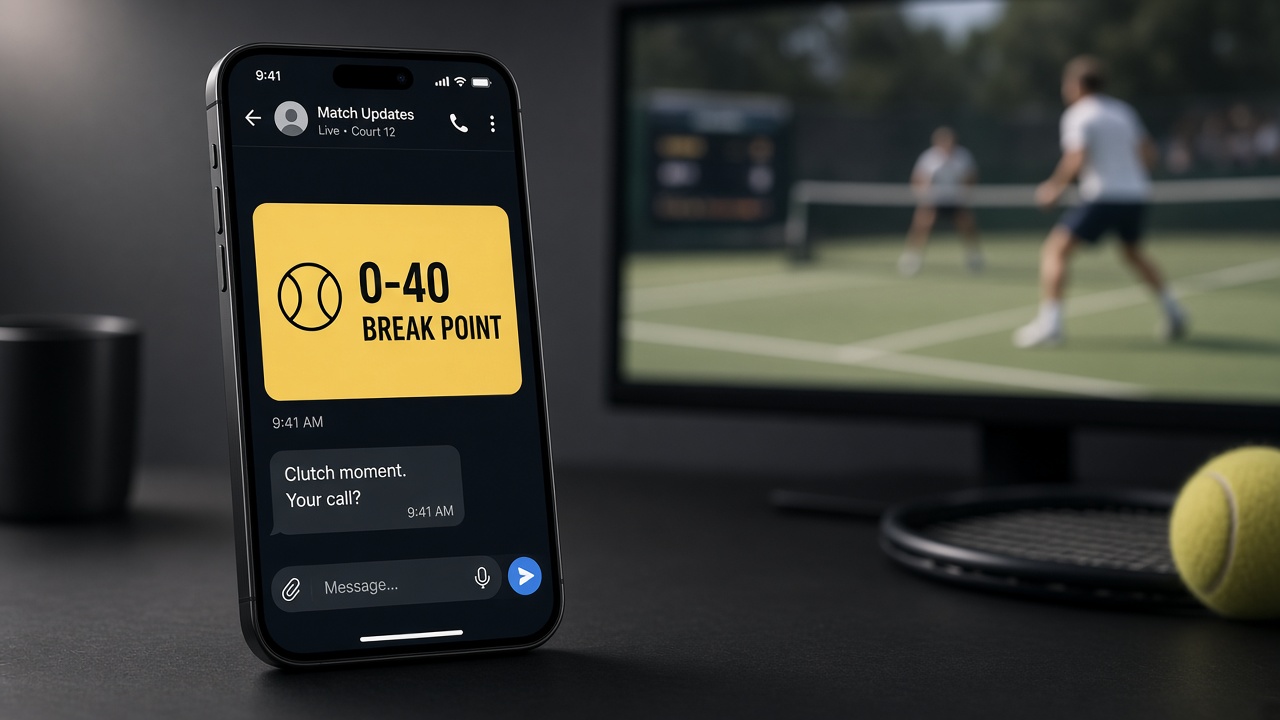
Hosted board vs this DIY Telegram bot
| Tennis Trader Board | This Telegram worker | |
| Where it runs | BotBlog in your browser | Your PC (leave the terminal open) |
| API key | None — our server holds the feed | Your own Live Tennis API Ultra key |
| Cost to watch | Free on BotBlog | Paid Ultra plan (10% off with code botblog) |
| How scores arrive | Timed check about every 8 seconds | Ultra WebSocket — each point as it commits |
| Alerts | On the board (filter / pin 0–40, 15–40…) | Telegram message to your phone |
| Best for | Second monitor next to the ladder | Away from the desk / a phone ping |
Open-source companions: the board sample is live-tennis-scoreboard. This guide clones tennis-trader-alerts.
Hosted Live Tennis API Alerts vs this DIY bot
Live Tennis API also sells a hosted product called Break-point Alerts. That is a different job from this GitHub worker. Their page is the tap-to-connect product (no Ultra key). This guide is the self-hosted path: your Ultra key, your PC, your 0–40 / 15–40 toggles.
| Hosted Break-point Alerts | This DIY Telegram worker | |
| Setup | Account, connect Telegram in their dashboard | Clone GitHub, .env, leave python -m app running |
| API key | None — standalone product | Your own Ultra key (GET /ws-token) |
| Cost | Free (swing ≥ 0.15, one channel) or Alerts Pro $9.99/mo | Paid Ultra plan (10% off with code botblog) |
| What fires | Break points by probability swing (they set the floor) | Score states you toggle: 0–40, 15–40, 30–40, deuce, tiebreak |
| Tours | ATP, WTA, Challenger, ITF | ATP / WTA filters in the bot (plus surface + player watchlist) |
| Who holds filters | Their dashboard | data/rules.json on your PC |
| Code | Closed hosted app | MIT — you can read it |
Use hosted Alerts if you want a tap-to-connect ping and you do not want a terminal. Use this guide if you want 0–40 / 15–40 as score states, a watchlist you control, and keys that never leave your machine. The Ultra CTA below is for the DIY worker, not for their hosted Alerts plan.
Prefer tap-to-connect, no Ultra key? That is Live Tennis API’s hosted Break-point Alerts (free tier or Alerts Pro). Different product from this DIY worker.
Affiliate link — disclosure
Why this is not a Flashscore or TennisTimeBot
Flashscore notifications and Telegram fan bots (TennisTimeBot, TennisAlertsBot, SiriusTennisBot, OnCourt) tell spectators the score. They are not built around Betfair tennis trading: who is serving, 0–40 / 15–40, rising-edge so a 15–40 that sits is one message, and an Ultra push when the point commits. This worker is also not a tipster channel — it does not send picks.
Tiny glossary (keep this handy)
| Word | Plain meaning |
| API key | Your private password for Live Tennis API. Never post it. Ultra is the plan that can open the push feed. |
| BotFather | Telegram’s official account that creates bots. You send /newbot and it gives you a token. Free. |
| Token | The long secret BotFather gives you (looks like 123456:ABC…). That is TELEGRAM_BOT_TOKEN. |
.env | A local text file of NAME=value lines. Git ignores it so secrets stay on your PC. |
venv / .venv | A private Python toolbox for this project only, so packages do not mess up the rest of your PC. |
| WebSocket / Ultra | The server pushes each point to you. Lower plans only let you poll REST (you ask on a timer). This worker is Ultra-only. |
/start | The first message you send your bot in Telegram. It opens the menu so you can toggle 0–40 / 15–40. |
| Rising-edge | A 15–40 that sits for three points is one Telegram message, not three. |
What you need
Computer
- A Windows 10/11 PC, a Mac, or a normal Linux desktop — not a phone alone. The worker runs on the computer; Telegram is only the inbox.
- Python 3.12 or newer (the project badge is Python 3.12)
- Git, so you can clone the repo
- A text editor (Notepad, TextEdit, or VS Code)
Telegram
- The Telegram app on your phone or desktop
- A free bot token from @BotFather — no paid Telegram plan
Live Tennis API Ultra
- A paid Ultra key. Basic / free cannot open
GET /ws-token. - 10% off Ultra with code
botblogat checkout (one word, lowercase)
Step 0 — Install Python and Git (do this once)
- Python: python.org/downloads — pick 3.12 or newer. Windows: tick Add python.exe to PATH, then Install Now.
- Check it: open PowerShell (Windows) or Terminal (Mac) and type:
On some Macs usepython --versionpython3 --version. You wantPython 3.12.x(or newer). - Git: if
gitis not recognised, install it from git-scm.com (Windows: tick Add Git to PATH).
Windows tip: File Explorer → View → enable File name extensions so you can see .env and not save .env.txt by mistake.
Step 1 — Create a Telegram bot with @BotFather (free)
- Open Telegram and search for @BotFather (the official one, with a blue tick).
- Send
/newbot. - Give it a name (what you will see in the chat list) and a username ending in
bot. - Copy the token it replies with. It looks like
123456:ABC…. That isTELEGRAM_BOT_TOKEN. - Paste it into Notepad temporarily if you need — do not post it on GitHub, Discord, or social media.
What “it worked” looks like: BotFather has given you a token, and you have saved it somewhere private. You have not started any Python yet.
Step 2 — Buy a Live Tennis API Ultra key (10% off with code botblog)
The whole point of this service is that a break point hits Telegram the moment it is played. That “server pushes each point to you” model is only on Live Tennis API’s Ultra plan.
- Polling (lower tiers): you ask on a timer via REST (for example
GET /matches?status=live). Between calls you are blind. The free plan is capped at 30 requests/min and 100 requests/day. - Push (Ultra): you connect once to a WebSocket. The server sends a frame on every score commit.
Real-time push is minted through GET /ws-token, documented as plan required: ULTRA. With a lower-tier key that request is rejected (HTTP 401/403). There is no WebSocket to connect to. This worker has no polling fallback. If the key is not Ultra, the process exits.
- Open this affiliate link.
- At checkout, enter promo code
botblog— that is 10% off the Ultra plan. One word, lowercase. - Choose Ultra, not the free key.
- Copy the API key from your Live Tennis API dashboard. That is
LIVE_TENNIS_API_KEY.
Subscribe to Ultra — 10% off with code botblog →
Affiliate link — code botblog. Disclosure
What “it worked” looks like: you have an Ultra key on screen, and you have not put it in GitHub.
Step 3 — Clone GitHub, venv, pip
A terminal is a text window where you type a command and press Enter. It is not Notepad and not your web browser.
Windows — open PowerShell in a folder: File Explorer → click the address bar → type powershell → Enter. Or hold Shift and right-click empty space → Open PowerShell window here.
Mac: Terminal from Spotlight.
Copy these commands from the project README. Run them one at a time.
Mac / Linux
git clone https://github.com/stephanepatteux/tennis-trader-alerts.git
cd tennis-trader-alerts

python3 -m venv .venv
source .venv/bin/activate
pip install -r requirements-dev.txt

cp .env.example .env
Windows PowerShell (same clone; activate and copy use Windows paths)
git clone https://github.com/stephanepatteux/tennis-trader-alerts.git
cd tennis-trader-alerts

python3 -m venv .venv
.venv\Scripts\Activate.ps1
pip install -r requirements-dev.txt

copy .env.example .env
If Activate.ps1 is blocked, the README’s Windows line is:
.venv\Scripts\activate
When activate works, the prompt starts with (.venv). If python3 fails on Windows, try py -m venv .venv then python -m venv as in our dashboard beginner guide.
What “it worked” looks like: a tennis-trader-alerts folder, a .venv folder inside it, pip finished without an error, and a new .env file sitting next to .env.example.
Step 4 — Put two secrets in .env
Open .env in a text editor. Paste your two secrets. No quotes. No spaces around =.
LIVE_TENNIS_API_KEY=paste_your_ultra_key_here
TELEGRAM_BOT_TOKEN=paste_your_botfather_token_here
Optional but recommended — lock the bot to you so strangers cannot /start and burn your Ultra quota. Message @userinfobot, copy your numeric Id, and set:
TELEGRAM_ALLOWED_CHATS=123456789
Replace 123456789 with your id. You can list more than one chat, comma-separated. Anyone already saved in data/rules.json keeps access.
.env is git-ignored. Never commit it. Never bake keys into a Docker image. The Ultra key is sent as Authorization: Bearer to Live Tennis API; the Telegram token is used only for Bot API calls.
What “it worked” looks like: two filled lines in .env, still on your PC only. The example file .env.example stays empty of real keys — that is correct.
Step 5 — python -m app (what success looks like)
With (.venv) still showing, run:
python -m app
Leave that terminal open. Ctrl+C stops it.
You should see log lines including:
Telegram bot menu started
Connected source=livetennisapi-ultra users=0 bot=on
users=0 means nobody has /started yet. bot=on means the Telegram token was accepted. If .env was missing a key, the process exits with a clear error (exit code 2). Fix .env and run python -m app again.
python -m app --dry-run still needs the Ultra key (it must consume the live feed) but logs alerts instead of sending them. Tests need no keys:
pytest
What “it worked” looks like: the process stays running. It does not return you to the prompt. Do not close the window.
Step 6 — /start and pick 0–40 + 15–40
- In Telegram, search for your bot (the name you gave BotFather).
- Tap Start or send
/start. - Use the persistent keyboard: ⚙️ Menu, Status, Pause, Resume.
- Toggle 0–40 and 15–40 (you can also use 30–40, Any BP, Deuce, Tiebreak).
- Optionally filter ATP/WTA, clay/hard/grass, and add a player watchlist (➕ Player, then type a name; tap ✕ name to remove).
Commands also appear in Telegram’s bot command list: /menu /status /on /off /help. /off pauses without wiping filters.
What 0–40 and 15–40 Telegram alerts actually send
0–40 is three break points against the server. 15–40 is two. The message names the players, tour, surface, sets / games / points, and who is serving. Rising-edge: the bot fires when that score newly appears, not on every point it sits. It does not place a Betfair bet and it is not a tip. Why traders watch 15–40 is in the 15–40 tennis trading strategy guide — this ping is only the score state.
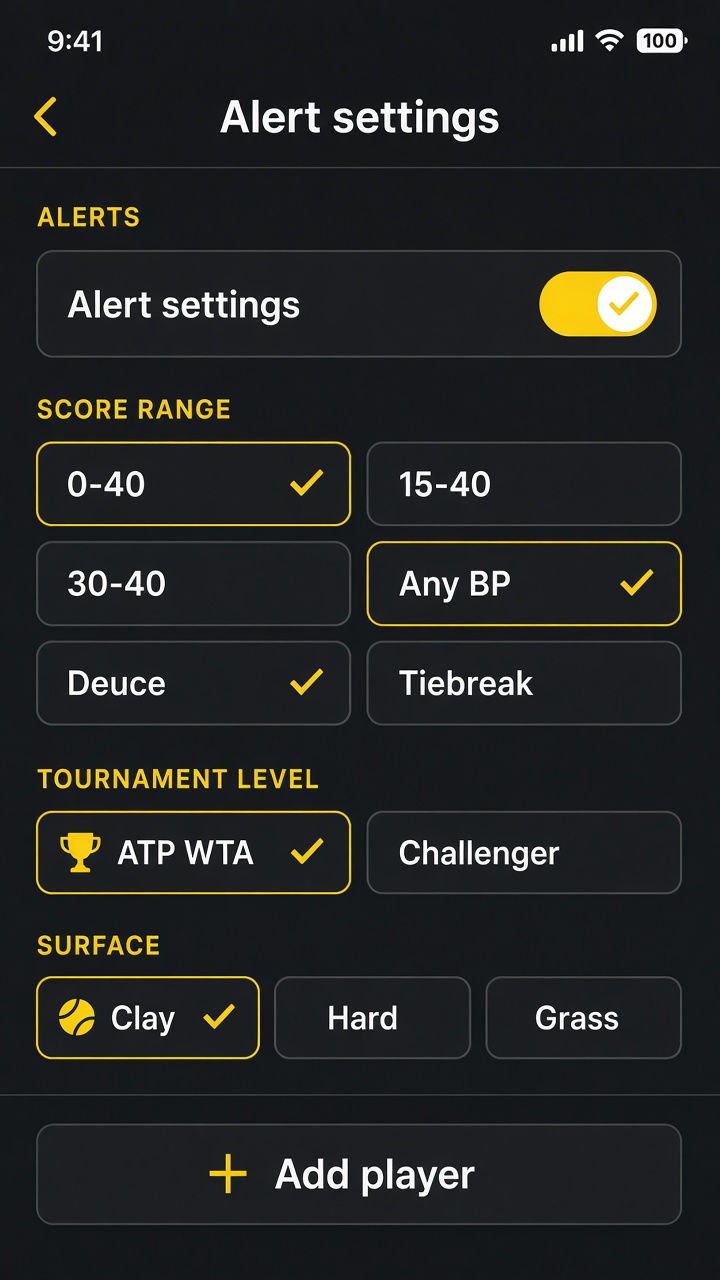
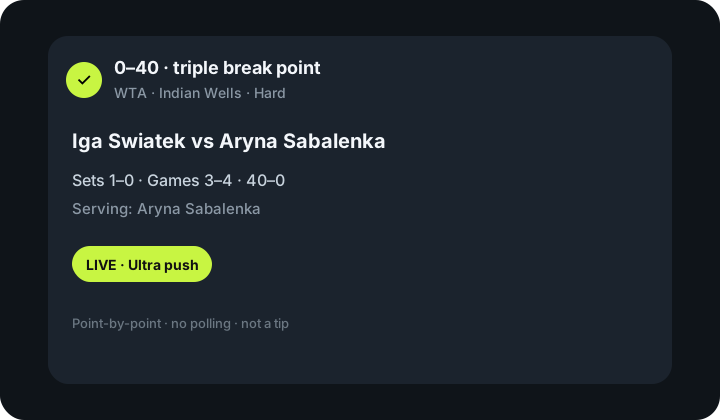
The menu works immediately. Telegram alerts only fire when a live ATP/WTA game actually hits that score. Rising-edge: a 15–40 that sits for three points is one message, not three.
What “it worked” looks like: you can open ⚙️ Menu and see 0–40 / 15–40 toggles. You may wait until a live match actually reaches that score before a ping arrives. That is expected.
Everyday use — starting again tomorrow
- Open PowerShell or Terminal in the
tennis-trader-alertsfolder - Activate the toolbox:
- Windows:
.venv\Scripts\Activate.ps1(or.venv\Scripts\activate) - Mac:
source .venv/bin/activate
- Windows:
python -m app- Leave it running. Your Telegram filters are stored in
data/rules.jsonon this PC — you do not need to rebuild them unless you want to.
That is the whole daily routine. Stop with Ctrl+C.
Keep the Tennis Trader Board open on a second screen when you are at the desk. Filters and pins are explained in the board guide.
If something goes wrong
These are the failures the project actually documents — not a guess list.
| What you see | What it means | What to do |
Process exits; log says LIVE_TENNIS_API_KEY is required | No Ultra key in the environment | Put LIVE_TENNIS_API_KEY=… in .env (no quotes). Run python -m app again. Exit code is 2. |
Process exits; log says TELEGRAM_BOT_TOKEN is required | No BotFather token (and you are not in --dry-run) | Paste the token into .env. Never commit it. |
Process exits; 401/403 on GET /ws-token | The key is not Ultra (or is wrong) | Subscribe to Ultra, code botblog, choose Ultra not the free key. There is no polling fallback. |
| Menu works; no Telegram pings | No live match has newly hit your toggled score | Leave it running during live ATP/WTA. Rising-edge: one message per new 15–40, not one per point it sits. |
Strangers can /start | Allowlist empty (and no TELEGRAM_CHAT_ID) | Set TELEGRAM_ALLOWED_CHATS to your numeric id from @userinfobot. |
git / python not recognised | Not on PATH, or you typed into a browser | Install Python 3.12+ and Git; run commands in PowerShell/Terminal inside the project folder. |
Full operations notes (reconnect, rules reload, Docker) live in the repo docs/OPERATIONS.md. Beginners can ignore Docker until this path works on the desktop.
Next steps
- Keep the free Tennis Trader Board on a second screen while this worker pings the phone
- Board guide — filters, pins, P1 odds gap
- 15–40 tennis trading strategy — why that score state is watched (not a signal from this bot)
- Break-point playbook — 0–40, 30–40, deuce, tiebreak
- Live Tennis API for exchange bots — licences, costs, and what a betting bot would still need (this Telegram worker is not that)
- 15–40 hold-rate match tape — after a ping, count whether the server actually held on completed matches
- BF Bot Manager tennis — if you want a bot that can place Betfair bets (this Telegram worker cannot)
- Build a personal scoreboard — another Python beginner path if you want a browser board on your PC
Source: github.com/stephanepatteux/tennis-trader-alerts (MIT). Board sample: live-tennis-scoreboard.
Disclaimer: This Telegram worker and all content on BotBlog are for educational and informational purposes only. Not financial or betting advice. Not a tipster. Live scores are informational only. They are not tips and do not place bets for you. This post contains affiliate links to Live Tennis API. Full disclosure.
chat_id, optional display name, and your trigger/filter choices in a local data/rules.json on the machine you run it on. It sets no cookies, has no public HTTP site, and does not send that file to BotBlog. Live scores are fetched from Live Tennis API; outbound messages go to Telegram’s Bot API.Compare Real-time Tennis Data API prices
Real-time Tennis Data API — current plans, free trial and what is included, in the BotBlog shop.
Pick the automation that fits your machine
Both run the strategies on this site. One needs Windows; one runs in a browser tab on anything.
Windows PC or VPS
BF Bot Manager
The visual rule builder every strategy guide here is written against. Import a settings file, cap the stake, leave it running. Best if you want maximum control over individual markets.
- 7-day free trial, then £29.95/mo or £119.95/yr
- Lay the Draw, dutching, goals and pre-race scalping presets
- BotBlog parameter maps import straight in
Mac, browser, no install
BetBot
A Betfair terminal and strategy builder that opens in a browser tab. Paper-trades every strategy first and shows how few bets have actually settled before it claims an edge. Best if you are not on Windows, or want to trade from a phone or tablet.
- 7-day free trial, no card, then £24.99/mo
- No VPS, no install — works on Mac and Windows alike
- Recorded-game replay with real fills, not modelled ones
Referral links — BotBlog may earn a share of payments from either product at no extra cost to you, and BetBot sign-ups through our link get 10% off the first 3 months. Neither is a profit claim or a free copy of the software. Disclosure