Table of Contents
- Traderline Is Now Free for All Betfair Users
- The 2026 Rebuild: Professional Execution Tools
- The Tennis Edge: Trading Shark & Live Stats
- Comparison Table: Traderline vs Geeks Toy
- Cost Comparison: Value for Money
- Why Traderline is the Superior 2026 Investment
- Who is Each Software Best For?
- Final Verdict: Traderline is emmerging a Clear Winner for 2026
- Frequently Asked Questions (FAQ)
If you're serious about Betfair trading software, you know the default exchange website is too slow for scalping and swing trading. The real debate in 2026 comes down to two names: Traderline and Geeks Toy.
While both are legitimate Betfair API software options, one feels like a modern trading terminal designed for 2026, and the other feels like a relic from 2010. In this detailed comparison, I'll explain why Traderline is not just the better value, it's the better trading software for Mac and Windows in almost every category that matters, especially with the massive updates we’ve seen in the last 12 months.
Traderline Is Now Free for All Betfair Users
Let's address the elephant in the room first. Since 21 May 2026, Traderline is permanently free for every Betfair trader — not a limited promo, not a lite version, and not a trial that expires.
You get the full platform unlocked: Advanced Ladder UI, One-Click Trading, Dutching, Trading Shark, and Multi-Market views. No subscription, no licence fee, no credit card. You only pay Betfair's standard exchange commission.
- New Users: Create a free account, download Traderline and trade with full features.
- Existing Users: Paid subscriptions and licences are no longer required on Betfair.
- Geeks Toy comparison: Geeks Toy still requires a paid subscription after its 14-day trial (~£60/year). Traderline costs nothing for the software itself.
Download Traderline Free (No Credit Card Required)

The 2026 Rebuild: Professional Execution Tools
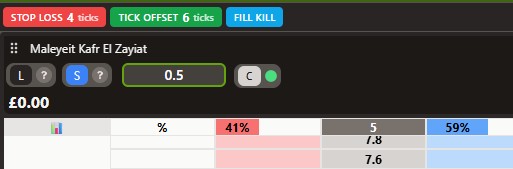
When Traderline was first rebuilt last year, it was a beautiful piece of software, but it was missing a few "hardcore" settings that professional scalpers demand. That has officially changed. Traderline has now integrated the "holy trinity" of automation tools that were previously only found in legacy software:
- Stop Loss: Automated exit points to protect your bankroll. If the market moves against you, the software gets you out at a pre-set level.
- Offset Tick: This automatically places a closing bet a specified number of ticks away as soon as your initial bet is matched.
- Fill or Kill (FOK): This ensures your bet is only placed if it can be matched immediately; otherwise, it is cancelled. This prevents you from being "left in the queue" while the price moves away.
What is Scalping?
For those new to the term, Scalping is a trading strategy where you aim to profit from tiny price fluctuations (ticks) within seconds. You might back a horse at 3.50 and immediately lay it at 3.45. To do this successfully, you need the Offset Tick and Stop Loss features mentioned above to manage your risk automatically. Without these, you simply cannot compete with the bots in a 2026 market.
The Tennis Edge: Trading Shark & Live Stats
If you trade tennis, you know how fast the momentum can shift. Traderline’s Ladder Interface is arguably the most intuitive on the market for tennis, but the real "killer feature" is the Live Stats and Scores window.
In the settings, you can enable the Trading Shark option, a feature inspired by the logic and popular strategies found at the TradeShark Tennis blog. This allows you to view match stats, score updates, and momentum indicators in a separate window directly alongside your ladder. Having this data integrated, rather than checking a separate browser tab, is a massive advantage when the score hits 30-40 or a tie-break begins.
Comparison Table: Traderline vs Geeks Toy
| Feature | Traderline (Winner) | Geeks Toy |
| Software Cost (Betfair) | Free — permanently | ~£60/year after 14-day trial |
| Interface Design | Modern, Clean, Customizable UI | Outdated Aesthetic |
| Platform | Native Windows, macOS & Mobile | Windows Only (Laggy on Mac via Emulator) |
| Pricing Model | No subscription on Betfair | Subscription only |
| Automation | Stop Loss, Offset, Fill or Kill | Stop Loss, Offset, Fill or Kill |
| Stats | Yes | Basic Ladder Only |
| Training Mode | Coming Very Soon | Practice Mode |
Cost Comparison: Value for Money
As an IT-savvy trader, the ROI is vital. Based on the latest Geeks Toy subscription data, let's look at the long-term costs.
- Geeks Toy: £6 for 1 month / £20 for 3 months / £60 for 1 year (after 14-day trial).
- Traderline: Free on Betfair — no monthly bill, no annual renewal, no one-time licence.
The maths is simple. Geeks Toy is a solid tool, but you pay every year. Traderline gives you the same class of ladder trading at zero software cost on Betfair, plus native Mac and mobile apps that Geeks Toy cannot match.
Why Traderline is the Superior 2026 Investment
1. True Cross-Platform Dominance (Mac Users Rejoice)
The biggest complaint in the Betfair community has always been the lack of native Mac trading software. Geeks Toy is a Windows application. While you can force it to run on a Mac using Parallels or Wine, the performance suffers from input lag, a death sentence for in-play trading.
Traderline offers native builds for both Windows and macOS. There is no emulation. There is no lag. It is optimized for modern hardware and Apple Silicon. Furthermore, Traderline supports iOS and Android, meaning you can monitor and hedge positions from your phone. Geeks Toy offers zero mobile support.
2. Modern UI vs. Outdated Legacy
Let's be honest about the outdated interface in Geeks Toy. It is very powerful and respoected software, but visually it is outdated. The interface relies on dense, tiny fonts and blocky windows. For new traders, it's like opening an Excel spreadsheet from 2005.
Traderline utilizes clean vector graphics and high-contrast color schemes. The Automatic Ladder Centering keeps the current trading price right where your eyes are looking. It looks like a modern financial trading app because it was coded like one.
3. Training Mode: The Sandbox Update
While Geeks Toy has a legacy practice mode, I have been told by the owner of Traderline that their new Training Mode is coming very soon. This will allow you to test your strategies with live data without risking real capital, an essential feature for those of us building backtesting systems like the one I use at botblog.co.uk/ask-bob a backtesing system I recently built for fun.
Who is Each Software Best For?
- Traderline is best for: Tennis and Football traders who need live stats; Mac users who want a native, lag-free app; and anyone who wants professional ladder software without a subscription.
- Geeks Toy is best for: Windows-only purists who have 10+ years of muscle memory and are happy with an annual subscription. Well respected in the industry.
Final Verdict: Traderline is emmerging a Clear Winner for 2026
The market for Betfair exchange software has changed. Traders no longer want to wrestle with a complex, outdated interface. They want speed, clarity, and flexibility across all their devices.
With the 2026 rebuild, the addition of Stop Loss/Offset tools, and the incredible Tennis and football Stats integration, Traderline has officially taken the crown. And with permanent free access on Betfair, there is zero reason not to switch.
Download Traderline Free for Betfair
Frequently Asked Questions (FAQ)
1. Is Traderline better than Geeks Toy for beginners?
This is a close call but Traderline's interface is modern and clean, reducing the chance of costly "fat-finger" mistakes.
2. Can I run Traderline on a Linux VPS?
Yes. For those running automation bots, Traderline is stable on VPS environments, which is how I monitor my strategies at botblog.co.uk.
3. Does Traderline require a credit card?
No. Download Traderline, sign in with your Betfair account and trade. There is no software subscription on Betfair.
Disclaimer: Sports trading involves significant financial risk. Never trade with money you cannot afford to lose. Past performance is not indicative of future results.
Automate this with BF Bot Manager
Betfair-certified automation — Lay the Draw, horse racing, dutching, goals markets and more. No coding. From £29.95/month or £119.95/year after a 7-day free trial.
Affiliate link — we may earn a commission at no extra cost to you. Full disclosure
Trade faster on the Geeks Toy ladder
Official Betfair trading client — ladder scalping, OCO, shortcuts and in-play tools. 14-day free trial, then from ~£8/month.
Affiliate link — we may earn a commission at no extra cost to you. Full disclosure